


 Communication Solutions
Training & Implementation
Funding
About Us
Contact
Support/Service
Find an AAC Consultant
Search
Communication Solutions
Training & Implementation
Funding
About Us
Contact
Support/Service
Find an AAC Consultant
Search
Select Language
Hey, NovaChat® Community! We’ve got a software update for you, especially if you frequently use WordPower® 60 Basic. Please update to version 2.49.1 to enjoy the full functionality of the ABC 123 page.
Experience new features and WordPower® vocabulary when you upgrade your Chat Software to version 2.49! Your overall communication experience improves with regular updates too. Here’s how to make them on your NovaChat® communication device: Connect to WiFi, then go to Menu > Help > Check for Updates and follow the prompts.
Personalize your AAC experience with a free custom voice from The Voice Keeper™ by Almagu. It’s an opportunity for your voice to have your regional accent. Your synthesized voice could also be created by a family member or peer. This option is now available at no charge on:
Learn more about creating a custom voice with The Voice Keeper today! Check out their updated app that simplifies the voice creation process!
Inclusive voices from Almagu, an international developer of text-to-speech technology, became available on new NovaChat devices with the 2.46 Chat Software update in January. This diverse voice collection has recently been updated for increased performance. Explore these voice options through the settings menu on your NovaChat, or through the voices page on our website.
Check out the 2.49 vocabulary updates for WordPower. You can add new words individually to your customized file or import an entire page with the help of this video tutorial.
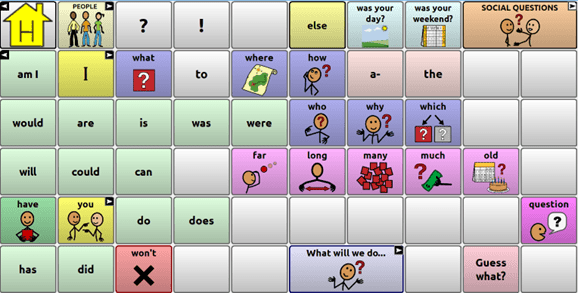
The QUESTIONS page has two new word options.


To help communicate a frequent need, a button for “to the bathroom” is now a logical next word following “go” on the WordPower 60 main page.

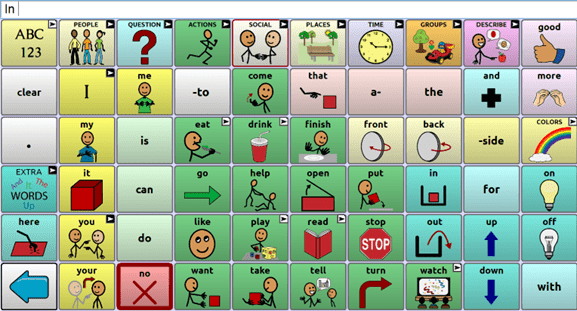
You may notice word completion is revised on the prepositions on the WordPower 60 main page (in, out, up, down, with) to make the simple beginning prepositions cleaner and easier to use. The image below features the button choices available after selecting the word “in” with update 2.49.
“Far” is now a logical next word after the QUESTION word “how.”

The WRITING TO APPS button label changed to LAUNCH APPS-WRITE to APPS to better explain the button action.

Within the LAUNCH APPS-WRITE to APPS page, SymbolStix buttons for Twitter > X and Messenger are updated with their new logos.


The adjective “special” is now available within the DESCRIBE A-Z pages.

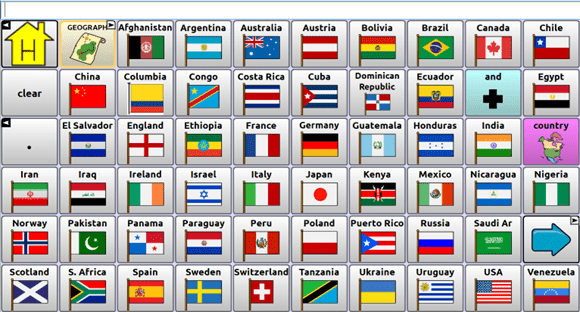
The COUNTRIES categories now feature an expanded collection of countries around the world. Please customize this category even further to meet the needs of your learners and community.
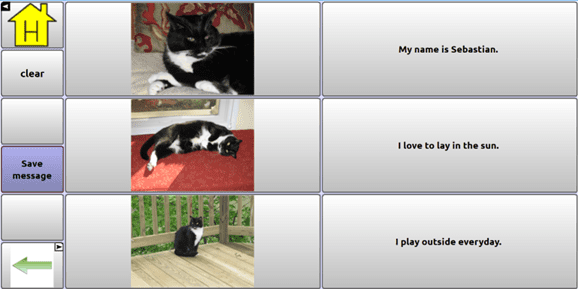
The “Save message” feature is now available on the PHOTOS pages so you can capture words from the speech display bar to a button to share specific information about your images.
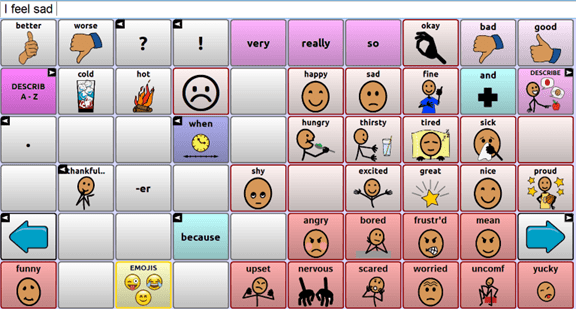
The EMOJIS on the “I feel” page provide a simple way to express emotions. They are set up with the flexibility to turn them off if you choose.
Each summer, PRC-Saltillo’s training and implementation team creates an interactive, at-your-own-pace four-week lesson plans, called the AAC Language Lab Summer Camp. It’s summertime fun to rock on with AAC no matter your AAC solution. You’ll find activities to do indoors and out. Plus, parents and caregivers can learn more through the AAC for Families Summer Webinar Series that ties into the camp activities. We hope this summer is overflowing with core words and language development!
Software Updates Company News
Familiar Symbols. Faster Visuals. More Time For Communication.
Published October 21, 2026PRC-Saltillo welcomes Ner Chat and Glint, bringing Minspeak symbols to Glint to help educators and clinicians create familiar visual supports faster.
 Software Updates
More Ways To Make AAC Your Own: What’s New In The 2026.3 App Update
Published October 14, 2026Discover what’s new in the 2026.3 AAC app update, including Modern Minspeak symbols, personalized AI features, new vocabularies, and accessibility updates.