


 Communication Solutions
Training & Implementation
Funding
About Us
Contact
Support/Service
Find an AAC Consultant
Search
Communication Solutions
Training & Implementation
Funding
About Us
Contact
Support/Service
Find an AAC Consultant
Search
Select Language
It’s time to upgrade your Chat Software to version 2.50 and access new features and vocabulary within WordPower®! Your overall communication experience improves with regular updates too. Here’s how to update your NovaChat® communication device: Connect to WiFi, then go to Menu > Help > Check for Updates and follow the prompts.
Your NovaChat comes pre-loaded with multiple AAC vocabulary files. These standard or original files must be copied and saved with a new name before they can be edited. A new “Auto-Open Vocabulary Once Duplicated” feature has been added with update 2.50. Now, when you make a copy of a vocabulary file, the duplicate file automatically opens for you to use and start customizing. A pop-up will appear displaying the file name to verify the new file opened.
A new button action called “Go to Vocabulary” has been added that allows you to directly switch between monolingual vocabulary files. Add a button with this action to your vocabulary file and when selected, you will go to the new vocabulary file of your choosing. The second vocabulary file will need a similar button if you would like to go back and forth between these two vocabulary files.
This new button action is beneficial if:
These are a few ways to use this new button action. What other use cases can you think of?
The WordPower team makes updates to benefit your communication experience. Check out the new words added in update 2.50.
WordPower 60 Basic (English)
Buttons for “stripes” and “polka dots” have been added to the CLOTHING pages so communicators can talk about these patterns.
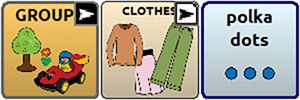
A button for the noun “line” has been added to the SHAPES page to create an opportunity to talk about lines on paper, roads, and more.

A button for the adjective “squiggly” has been added to the DESCRIBE pages because not all lines are straight.

WordPower 42 Basic (English)
Past participle verbs are now included with core verbs and subsequent ACTIONS pages so communicators can use this verb tense.

_____________________________________________________________________________________
Start AAC Awareness Month strong as Kevin Williams, PRC-Saltillo Contractor for Training and Education, Products and Services hosts a panel webinar “Voices of AAC: What is Your Professional Vibe as an AAC User” on Tuesday, October 1. Learn more about this leadership-focused event, training discounts, and other AAC Awareness Month celebrations.
Software Updates Company News
Familiar Symbols. Faster Visuals. More Time For Communication.
Published October 21, 2026PRC-Saltillo welcomes Ner Chat and Glint, bringing Minspeak symbols to Glint to help educators and clinicians create familiar visual supports faster.
 Software Updates
More Ways To Make AAC Your Own: What’s New In The 2026.3 App Update
Published October 14, 2026Discover what’s new in the 2026.3 AAC app update, including Modern Minspeak symbols, personalized AI features, new vocabularies, and accessibility updates.