


 Communication Solutions
Training & Implementation
Funding
About Us
Contact
Support/Service
Find an AAC Consultant
Search
Communication Solutions
Training & Implementation
Funding
About Us
Contact
Support/Service
Find an AAC Consultant
Search
Select Language
A new modern version of Minspeak® multi-meaning symbols will be coming to Accent® (Empower® software), NovaChat®, and Via®/iOS devices with their respective software updates this fall. The Modern symbol set will be available for English and Spanish LAMP Words for Life®, Unity®/Unidad®, and Engage® vocabulary files.
Modern symbols feature simplified details, lines, and colors for visual clarity while maintaining the composition of the Classic symbols that are established for countless communicators. On the technical side, the symbols have also been redrawn in a scalable, never-blurry format that removes pixelation and allows for more symbol options down the road.
Here’s a comparison of some well-loved Minspeak symbols found on the home page of LAMP Words for Life and Unity vocabularies. The left symbol in the pair is Classic; the right symbol is Modern.
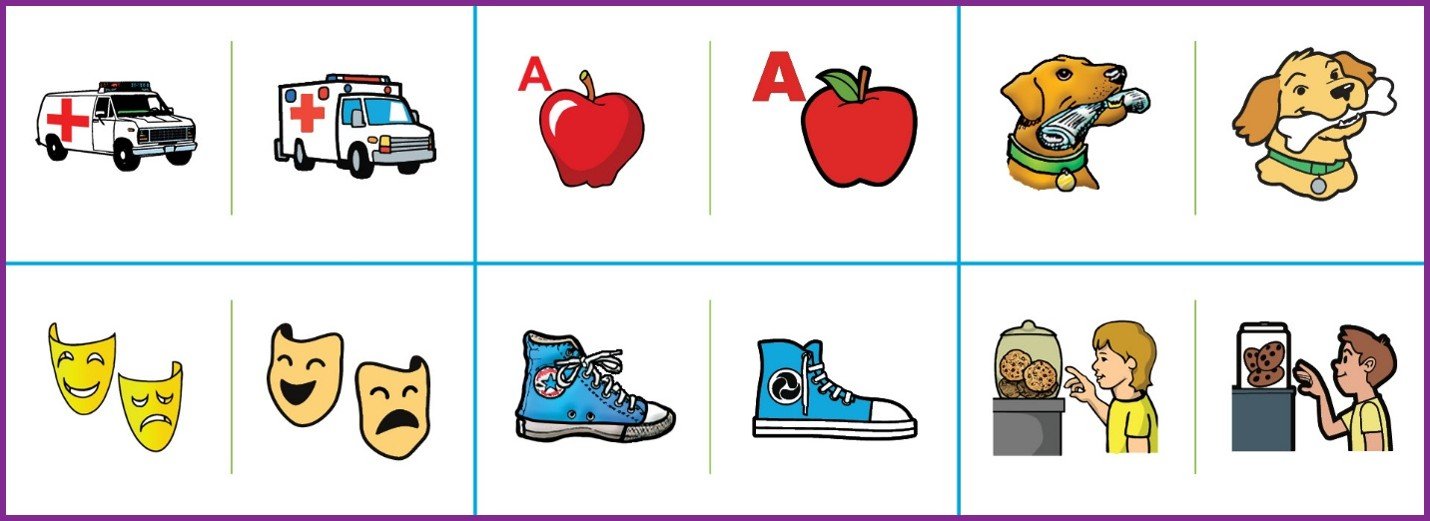
Even good changes can be challenging at times. Here’s some information to help you prepare.
Will this change my customized LAMP Words for Life or Unity vocabulary file?
How can I use Modern symbols in my customized vocabulary file?
If I delete my customized vocabulary file for NovaChat/iOS, where can I find a default vocabulary file that matches the Minspeak symbols I’m using now?
We use emulator/companion software such as PASS/Empower/ChatEditor™ to support language in the classroom. Will these match the new Modern Minspeak symbols?
Will the lite-tech boards and wall charts on AAC Language Lab® have Classic or Modern symbols?
Will the Smart Charts or Smart Chart Generator on AAC Language Lab have Classic or Modern symbols?
Will Modern Symbols be available on other therapy material platforms?
Will Modern symbols be available for all LAMP words for Life and Unity vocabulary files such as VI, French, Spanish, German?
Will Modern symbols be available for WordPower® or TouchChat®?
Watch for even more improvements and options for Minspeak symbols and vocabularies so you can use AAC with confidence. Your PRC-Saltillo AAC Consultant is always ready to assist with your questions no matter how big or small. Connect with them today!
Products Company News
Familiar Symbols. Faster Visuals. More Time For Communication.
Published October 21, 2026PRC-Saltillo welcomes Ner Chat and Glint, bringing Minspeak symbols to Glint to help educators and clinicians create familiar visual supports faster.
 Software Updates
More Ways To Make AAC Your Own: What’s New In The 2026.3 App Update
Published October 14, 2026Discover what’s new in the 2026.3 AAC app update, including Modern Minspeak symbols, personalized AI features, new vocabularies, and accessibility updates.